tl;dr: I wanted to test one of my snaps on riscv64. I don’t own any RISC-V hardware. I set up a QEMU VM on my ThinkPad, installed Ubuntu desktop inside it, and it actually worked. Slowly. Very slowly. But it worked.
I maintain nearly 50 snaps in the Snap Store. Most of the time I test things on my ThinkPad running Ubuntu 24.04 (amd64), or my MacBook Air running Ubuntu Asahi (arm64). That covers the two architectures most people care about. But some of my snaps are built for more… exotic architectures. Things like s390x, ppc64el, and riscv64.
Now, I don’t care massively about s390x or ppc64el – my wife (and UK house construction) has made it abundantly clear that an IBM mainframe in the spare room is a non-starter – but I do care about RISC-V. It feels like the future. Or at least, a very exciting chunk of the future.
The problem? I don’t own any RISC-V hardware.
The hardware question
I recently updated Notepad Next to the latest upstream release and, as I was feeling smug about shipping the update, a tiny voice in the back of my head asked: “Did you actually test this on riscv64?”
Reader, I had not.
Notepad Next is a bit different from some of my other snaps. A lot of what I publish is essentially repackaged upstream .deb files – I only build for the architectures the upstream project builds for. But Notepad Next is built from source, which means I can (and do) target riscv64. Same story for ppc64el and s390x, actually.
Some of my other snaps need specific build tooling or components that haven’t made it to those architectures yet – I haven’t done a proper audit of which ones and why, but it’s on the list. Point is: the Notepad Next riscv64 snap exists and is in the store. Whether it works was the question I’d never answered.
So I started a thread on the Ubuntu Discourse asking whether there was a reasonably priced RISC-V board I could buy that’d run Ubuntu desktop well enough to do basic snap testing. Even just “does the window paint?” would do me.
The response from Heinrich (@xypron) was quick and genuinely excellent. The short version: don’t buy hardware quite yet. Here’s why, and it’s actually quite interesting.
A quick detour into ISA profiles
RISC-V is an open instruction set architecture, which means chip designers have a lot of latitude in what they implement. That’s great for flexibility, but software portability requires some agreement on a baseline. Enter the RVA profiles – essentially standardised bundles of RISC-V extensions that application processors must support.
Up to Ubuntu 24.04 (Noble) and core24, Ubuntu targets RVA20 – a relatively minimal baseline. With Ubuntu 25.10 (Questing) and core26, the requirement jumps to RVA23, which mandates a much richer set of features including the Vector extension (handy for AI/ML workloads and generally going faster) and the Hypervisor extension. RVA23 was only ratified in October 2024.
Here’s the fun bit: as of right now, there are essentially zero RVA23-compliant RISC-V boards you can actually buy. They’re coming – a handful of promising-looking boards from Sipeed, Milk-V, Banana Pi and others are expected around April/May 2026 – but they’re not on shelves yet. Even the Orange Pi RV2, released in March 2025, is RVA20 only, which means it already can’t run Ubuntu 25.10. Ouch.
So buying hardware right now feels like bad timing. A VM, on the other hand, is free and available immediately.
Getting the VM running
Heinrich pointed me at the Canonical docs for running Ubuntu RISC-V in QEMU, which are pretty solid. I hit one snag immediately: the docs reference a -cpu rva23s64 flag in the live server image section, but when I tried it on my Ubuntu 24.04 ThinkPad, QEMU spat back:
qemu-system-riscv64: unable to find CPU model 'rva23s64'
Turns out the version of QEMU in Ubuntu 24.04 is too old to know about RVA23. You need Ubuntu 25.10 or later for that. Since I’m firmly in the LTS camp and have no intention of running a non-LTS release on my daily driver just to get a newer QEMU, I dropped the -cpu flag and carried on with the default CPU emulation – which gives you RVA20, perfectly fine for testing core24-based snaps.
The docs do mention this, to be fair, but the caveat is tucked away in a callout box earlier in the page. If, like me, you navigate directly to the “live server image” section using the right-hand nav, you’ll miss it entirely. I’ve fed that back; hopefully it’ll get bumped up to the prerequisites section where it belongs.
Anyway! Here’s the install script I ended up using, with a couple of tweaks (I bumped the RAM up to 16GB and gave it 4 CPUs because I’m impatient and have RAM to burn):
#!/bin/bash
# https://canonical-ubuntu-hardware-support.readthedocs-hosted.com/boards/how-to/qemu-riscv/
qemu-system-riscv64 \
  -machine virt,acpi=off -m 16G -smp cpus=4 \
  -nographic \
  -kernel /usr/lib/u-boot/qemu-riscv64_smode/u-boot.bin \
  -netdev user,id=net0 \
  -device virtio-net-device,netdev=net0 \
  -device virtio-rng-pci \
  -drive file=disk,format=raw,if=virtio \
  -drive file=ubuntu-24.04.4-live-server-riscv64.iso,format=raw,if=virtio
The server installer runs headlessly (no GUI during install, which is fine). Once Ubuntu Server was installed on the virtual disk, and rebooted, I installed the desktop with sudo apt install ubuntu-desktop. That took a while, but when it finished, I rebooted with a slightly different launch script that adds a virtual GPU and input devices so I can actually get a desktop:
#!/bin/bash
qemu-system-riscv64 \
  -machine virt,acpi=off -m 16G -smp cpus=4 \
  -kernel /usr/lib/u-boot/qemu-riscv64_smode/u-boot.bin \
  -netdev user,id=net0 \
  -device virtio-net-device,netdev=net0 \
  -device virtio-rng-pci \
  -device virtio-gpu-pci \
  -device virtio-keyboard-pci \
  -device virtio-tablet-pci \
  -display gtk \
  -serial mon:stdio \
  -drive file=disk,format=raw,if=virtio
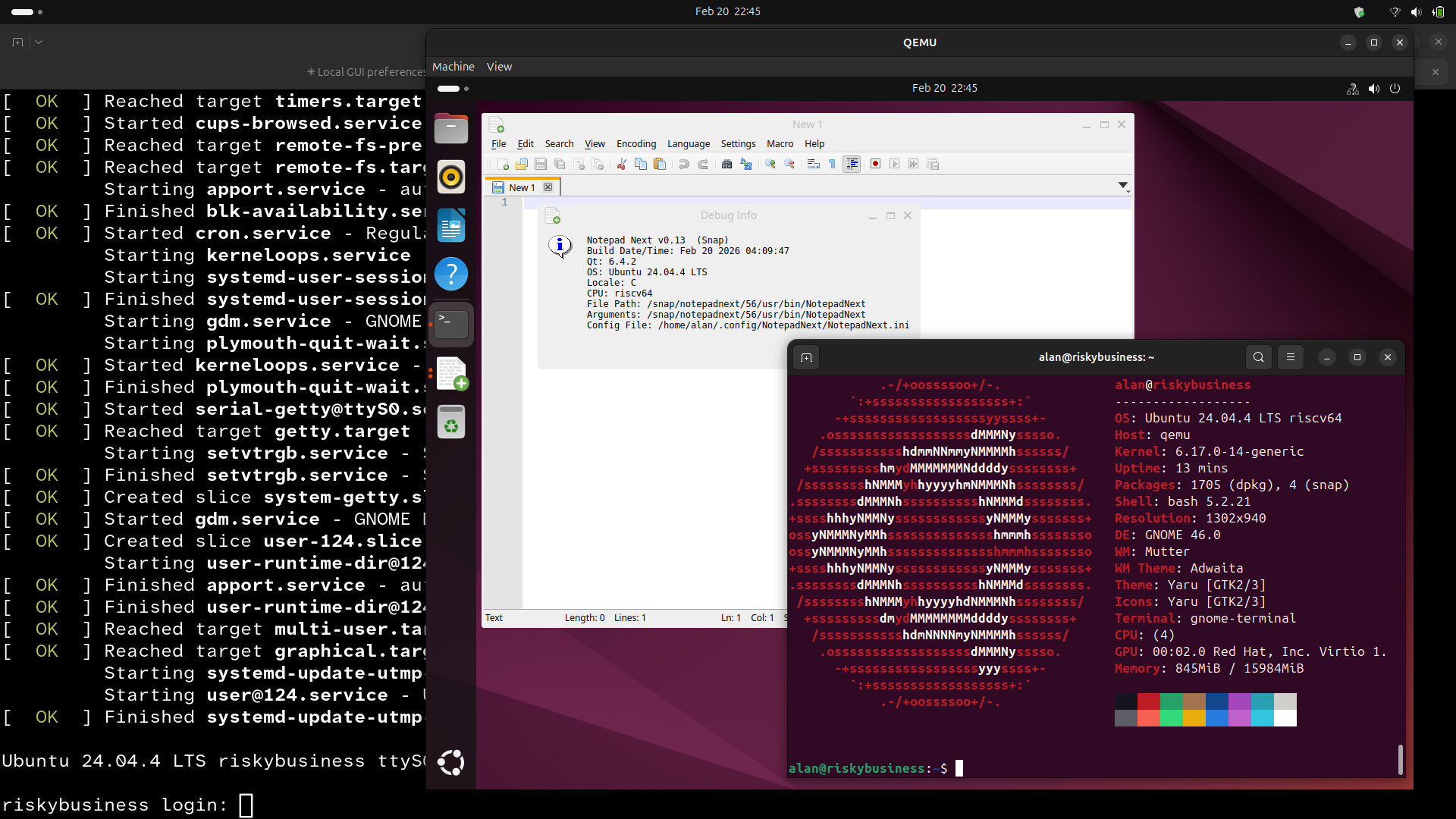
The key additions for desktop use are virtio-gpu-pci (so you get a display), virtio-keyboard-pci, virtio-tablet-pci, and -display gtk to open a window on the host. After a bit of fiddling – and a lot of waiting, because this thing is not quick – I got a working Ubuntu GNOME desktop running inside a RISC-V VM on my ThinkPad.
I was genuinely quite chuffed.
Did the snap work?
Yes! See screenshot at the top of this blog.
I just snap install‘ed Notepad Next (it’s a classic snap, so --classic needed), it launched, the window painted, and I could use it. I’m not going to pretend the experience was snappy (pun very much intended) – it’s CPU emulation all the way down, so every riscv64 instruction is being translated in software by QEMU running on my Intel i5. It’s impressively sluggish. But for the purposes of “does this thing actually run on riscv64”, it absolutely does the job.
This isn’t something I’d use as a daily development environment. It’s more like an on-demand sanity check: spin it up, install the snap, verify it launches, move on with your life.
Aside: I guess I could add some automation here, to spin up a machine and test each of these during the build in a GitHub action…
What about my other snaps?
Honestly, this whole exercise made me realise I should do a proper audit of my snap portfolio and riscv64 support. My current understanding is roughly:
- Most of my snaps are amd64 only – either because the upstream doesn’t build for other architectures, or because I’m repackaging .deb files and only publishing what upstream provides.
- telegram-asahi is arm64 only – that one exists specifically for the Apple Silicon Linux crowd.
- Some build from source and may target riscv64 (and ppc64el and s390x) just fine.
- Various others are somewhere in between – I suspect some are missing riscv64 builds due to missing build dependencies or tools that haven’t been ported yet, but I haven’t actually investigated.
The plan is to go through each snap and understand why it does or doesn’t build for the interesting architectures, and fix what I can. I’ll report back in another blog post.
What’s next for RISC-V hardware?
If you’re thinking about picking up a RISC-V board right now: it’s complicated. Anything currently available is RVA20, which means it’ll run Ubuntu 24.04 but not Ubuntu 25.10. The genuinely exciting RVA23 hardware (with proper vector support, better performance, etc.) is expected to land around April-May 2026. The DeepComputing Framework laptop mainboard in particular looks very interesting – a RISC-V chip in a Framework 13. Yes please.
For now though, QEMU is your friend. It’s a bit like going to the gym – tedious, slow, not something you’d do for fun – but you come away knowing your snap actually works on the architecture it claims to support. And that’s got to count for something.
Thanks to Heinrich Schuchardt (xypron) from Canonical for the fast and helpful response on Discourse, and for pointing me at the docs.